Google Business Profile is a tool from Google that lets you control how your chiropractic practice appears in Google Search and Google Maps. Formerly known as Google My Business, this tool builds a profile for your practice to display basic information, such as your office’s hours and address.
If you don’t already have a profile for your practice, we recommend setting up one. It is free to do, and it increases your chances of appearing in local Google searches when potential patients are looking for chiropractic care.
Keep reading if you want to learn more about Google Business Profile and Google My Business for chiropractors. We talk about the benefits of having a profile and give step-by-step instructions on how to create one. We also provide tips on how to optimize your profile to keep it relevant and updated.
The Importance of Google Business Profile for Chiropractic Practices
Having a Google Business Profile can drive new patient acquisition by making your practice discoverable on Google, providing information about your chiropractic services, and offering direct channels for patients to contact you.
Here are more details on some of the benefits of setting up a profile for your practice:
- Improves your local visibility: Google Business Profile listings are usually the first items to appear for local searches on Google. Having a verified, up-to-date profile, especially one with a lot of patient reviews, sends a signal to Google that you’re a credible and trustworthy chiropractic provider. This increases your chances of showing up when potential patients search for chiropractic services near them.
- Provides information about your practice: A potential patient is likely going to compare several chiropractors before they choose one and book an appointment. During their initial search, they may just look at Google listings, so you want to make sure yours provides basic information about where you are located and what services you offer. If you leave your profile sparse, they may skip over your practice entirely.
- Gives patients a way to leave online reviews: Google My Business has a section where your patients can leave reviews about their experiences with your practice. This might be the most important component of your profile because current patients want to know that you’re listening to them, and potential patients want to see real examples of how you provide care.
View Website Design Options
How To Claim an Existing Google Business Profile
Google sometimes creates profiles for businesses, organizations, or practices based on information it discovers online. For example, maybe Google finds your practice’s website, or it sees your listings on other local business directories, such as Yelp and Healthgrades. In which case, you want to claim the existing profile and update the information on it instead of creating a new profile from scratch. Below is what that process looks like.
Step #1. Log Into Your Google Account
You need a Google account to be able to claim a business profile. Either log into your existing account, or create a new one.
Step #2. Find Your Practice
Type your practice’s name into Google Search or Google Maps. You can add your city and state to the end of your search to help Google find you in case there are multiple chiropractic businesses with the same name.
If you don’t find your practice, then Google hasn’t created a profile for you. In which case, move on to the next section where we talk about how to set up a new profile. If you do find your practice, click the link that says “Own this business,” “Claim this business,” or something similar.
Step #3. Verify Your Practice
After clicking the link, Google will offer you a list of verification methods. The available methods can vary depending on several factors, such as business type and location, but here are some of the potential options you may see:
- Video recording
- Phone or text
- Live video call
Choose one of the verification methods, and follow the on-screen instructions. In some cases, you may have to verify your business with more than one method.
Step #4. Wait for Your Confirmation Email
After you complete the verification steps, Google needs to review the information you provided. This can take up to five business days. Google will send you a follow-up email once it has verified your profile.
How To Set Up a New Google Business Profile
If you can’t find an existing Google Business Profile for your practice, you are going to create a new one. Below is a step-by-step guide.
Step #1. Log Into Your Google Account
Just like with claiming an existing business profile, you need a Google account to be able to create a new profile. Log into your Google account, or sign up for a new one.
Step #2. Add Your Practice
Visit the Google Business Create page. Under “Can’t find your business?,” click “Add your business to Google.”
Step #3. Enter Your Practice Name & Business Category
Type the business name of your practice into the first box. In the second box, start typing what you do, and Google will load a drop-down menu of potential business categories to choose from. Some of the most relevant ones for a chiropractic practice include:
- Chiropractor
- Medical group
- Medical center
- Medical clinic
- Medical office
There are also business categories for specific chiropractic areas of practice, such as sports injuries and spinal adjustments. Don’t get too hung up on the category, though, because you can change it or add more later.
Step #4. Add Your Location
The next page will ask if you have a physical location. Click “Yes” and “Next,” and you’ll go to a new screen to add your address.
Step #5. Fill In Your Service Area
The next page will ask if you provide deliveries or home and office visits. Since you offer at-home and/or in-office appointments, click “Yes” and “Next” to get to the screen where you input what areas you service. You can input the entire country, an entire state within the country, or a specific city or town. You can also add more than one location.
Step #6. Add Your Contact Details
On the next screen, add the phone number for your office’s front desk and the URL for your practice’s website.
Step #7. Set Your Notification Preferences
Decide if you want to receive notifications from Google about how to manage your profile. Select “Yes” or “No” and then “Next.”
Step #8. Verify Your Practice
The last step in setting up your new Google Business Profile is to verify it. This process is going to look similar to the one in the previous section, following steps 3 and 4.
Best Practices for Optimizing Your Chiropractic Google Business Profile
Now that you have your Google Business Profile created, you may think that you’re done. However, that is just the first step because a bare-bones profile may limit your ability to rank in local Google search results. Below, we offer some recommendations on how to optimize your profile for maximum online visibility.
Add Additional Business Information
Outside of the basic information required to create a profile, there are several other sections that are optional. We recommend filling in at least some of these sections because a more complete Google Business Profile provides useful practice details to both Google and patients. Google’s algorithm uses this information to determine rankings, and potential patients read it to learn more about your practice.
Here are some of the additional sections we recommend including on your profile:
- Business Description: Briefly describe who you are and what you do within Google’s 750-character limit.
- Business Hours: Add your office’s operating hours so that patients know when you’re available for appointments.
- Products/Services: Provide more details on your core services since Google limits how long your main business description can be.
- Photos: Add high-quality photos of your logo, treatment rooms, and team members to humanize your chiropractic clinic and show patients what to expect when they visit.
- Updates: Share timely information with patients, such as new business hours, discounted services, and upcoming events.
Respond to Patient Reviews & Questions
Google offers several opportunities for patient engagement on your profile. You can address common patient concerns through the Q&A section and encourage patient feedback with the reviews section. Check your profile a few times a week, and respond to any questions or reviews that have come through. Not only does this improve patient satisfaction by showing your current patients that you care, but it can also attract new patients by providing Google users with helpful insights on what your chiropractic care is like. When responding, keep comments focused on your practice and services, and avoid referencing any individual’s specific treatment to remain HIPAA compliant.
Keep Information Updated
Aside from staying on top of questions and reviews, also keep the information in the other sections up to date. For example, if your address, hours, or services change, make sure your Google Business Profile reflects that. This ensures that patients get accurate information. It also signals to Google that your practice is still open and accepting patients, increasing your chances of appearing in local search results.
Examples of Optimized Google Business Profile Chiropractic Listings
Looking at examples of Google My Business chiropractic listings can help you get inspiration for your own profile. To save you from having to comb through the thousands of listings on Google, we explore two examples below: The Joint Chiropractic and Crabtree Chiropractic Center.
The Joint Chiropractic; Chicago, IL
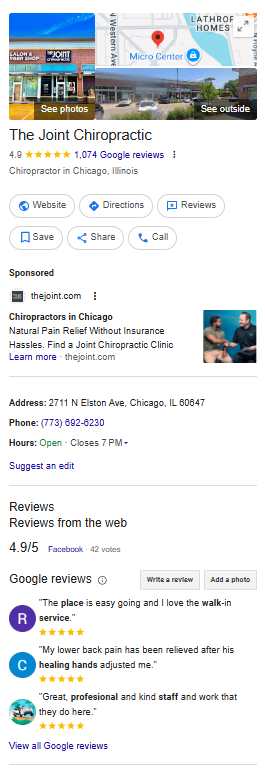
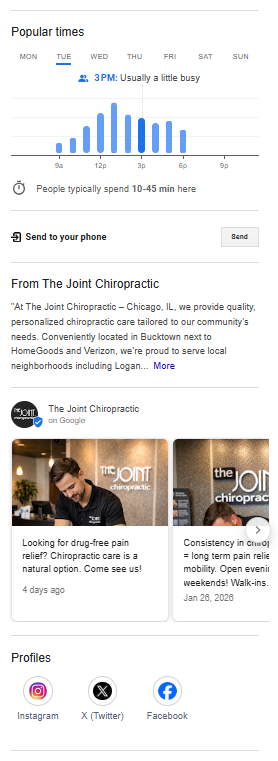
The Joint Chiropractic is a popular chiropractic chain with locations across the country. Looking at a location in Chicago, we like that the profile has over 1,000 patient reviews and that a staff member has taken the time to respond to the majority of them. We also like that the practice uses the Updates section to post educational content with high-quality images and videos on an almost daily basis.
Crabtree Chiropractic Center; Raleigh, NC
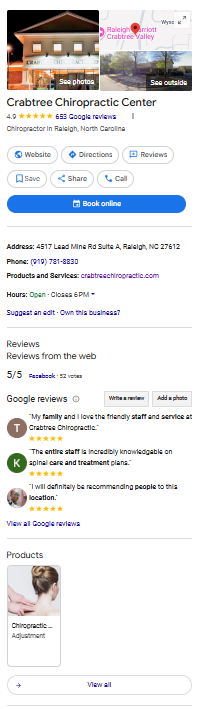
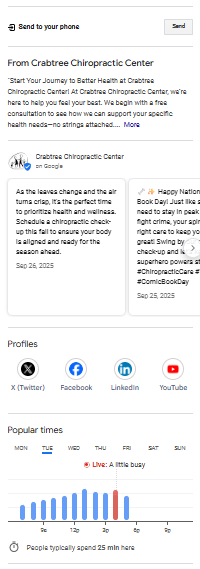
A large chiropractic chain may not be relevant to your small private practice, which is why we have included Crabtree Chiropractic Center as an example as well. For a practice with just three chiropractors, it has a lot of patient feedback—over 600 positive reviews with an overall rating of 4.9 stars. Compared to other chiropractic clinics close by with 200 to 300 reviews, this practice stands out. We also like that the practice has taken the time to fill out almost every available Google My Business section, including the Updates section that has posts related to the season, holiday, or time of year.
Final Thoughts
Google Business Profile is a free tool that can improve your chiropractic practice’s online visibility. An optimized profile can help you rank higher in local search results and provide useful information about your services to potential patients.
Contact us today if you need help with creating your Google Business Profile. Online Chiro offers digital marketing solutions for chiropractors, including an SEO service that manages your Google profile and other local SEO efforts.

Katie McNichols is an experienced writer and editor, specializing in digital content. The aim of her blog posts is to demystify digital marketing for healthcare professionals. She hopes to equip them with the tools they need to build an online presence that promotes their services and grows their practice.